Linux中的零拷贝技术
1. 传统 IO 有什么问题?
以文件通过网络发送为例,传统 IO 的数据路径:
磁盘 → DMA 拷贝 → 内核缓冲区(PageCache)
     → CPU 拷贝 → 用户缓冲区
     → CPU 拷贝 → Socket 缓冲区
     → DMA 拷贝 → 网卡
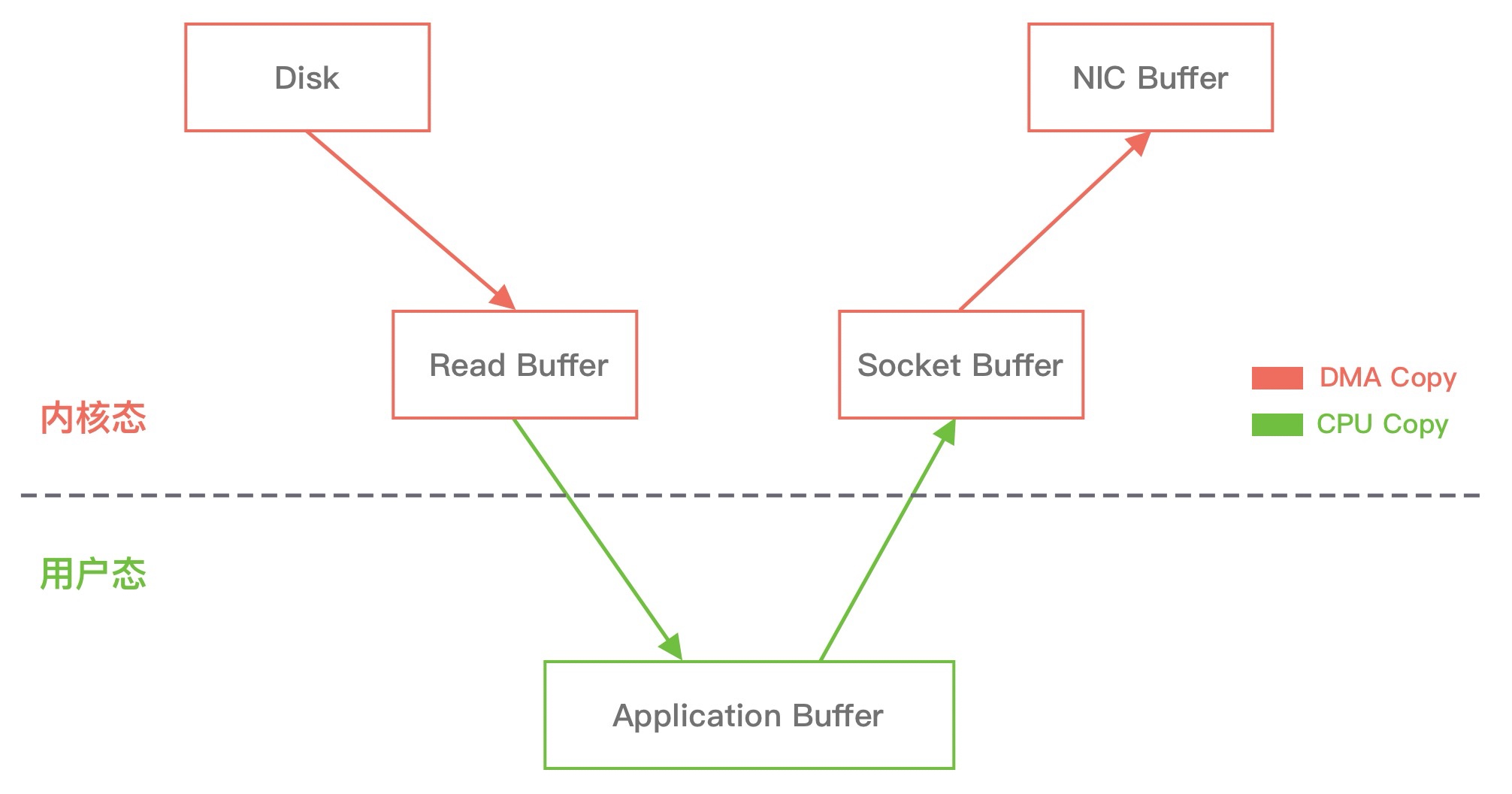
一共 4 次拷贝(2 次 DMA + 2 次 CPU),4 次上下文切换(用户态↔内核态)。CPU 拷贝是纯软件操作,占用 CPU 资源,数据量大时开销明显。
2. sendfile
Linux 2.1 引入 sendfile 系统调用,可以直接在内核态把数据从文件描述符传输到 Socket,跳过用户态:
磁盘 → DMA 拷贝 → 内核缓冲区(PageCache)
     → CPU 拷贝 → Socket 缓冲区
     → DMA 拷贝 → 网卡
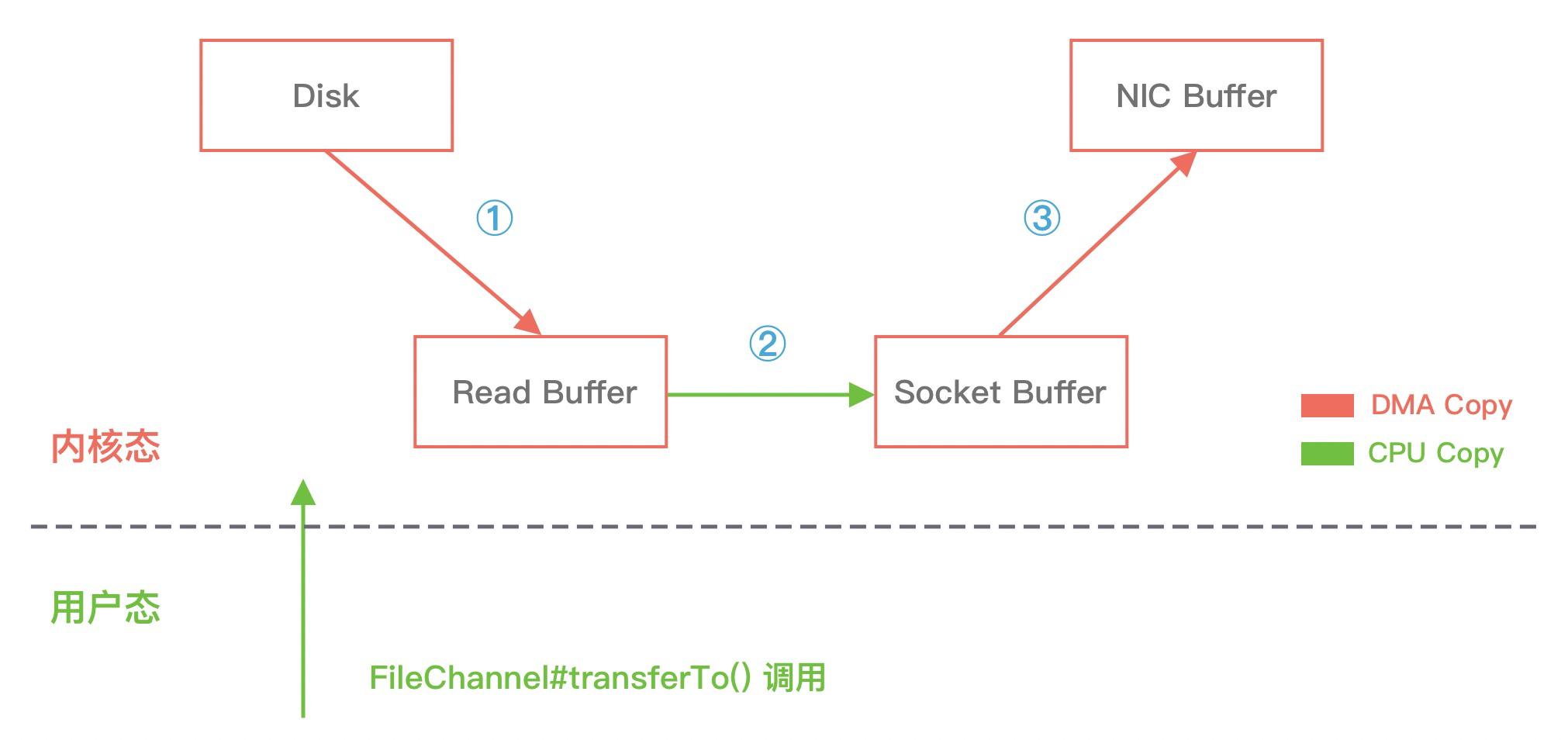
减少到 3 次拷贝、2 次上下文切换,省掉了内核缓冲区→用户缓冲区→Socket 缓冲区这两步 CPU 拷贝中的一步。
Java 中 FileChannel.transferTo() 底层就是调用 sendfile。
3. sendfile + DMA Gather(真正的零拷贝)
Linux 2.4 之后,配合支持 Scatter/Gather 的网卡,sendfile 可以进一步优化:不再把数据拷贝到 Socket 缓冲区,而是只把数据的位置和长度写入 Socket 缓冲区,DMA 引擎直接从 PageCache 读取数据发到网卡。
磁盘 → DMA 拷贝 → 内核缓冲区(PageCache)
     → DMA 拷贝 → 网卡(直接从 PageCache 读)
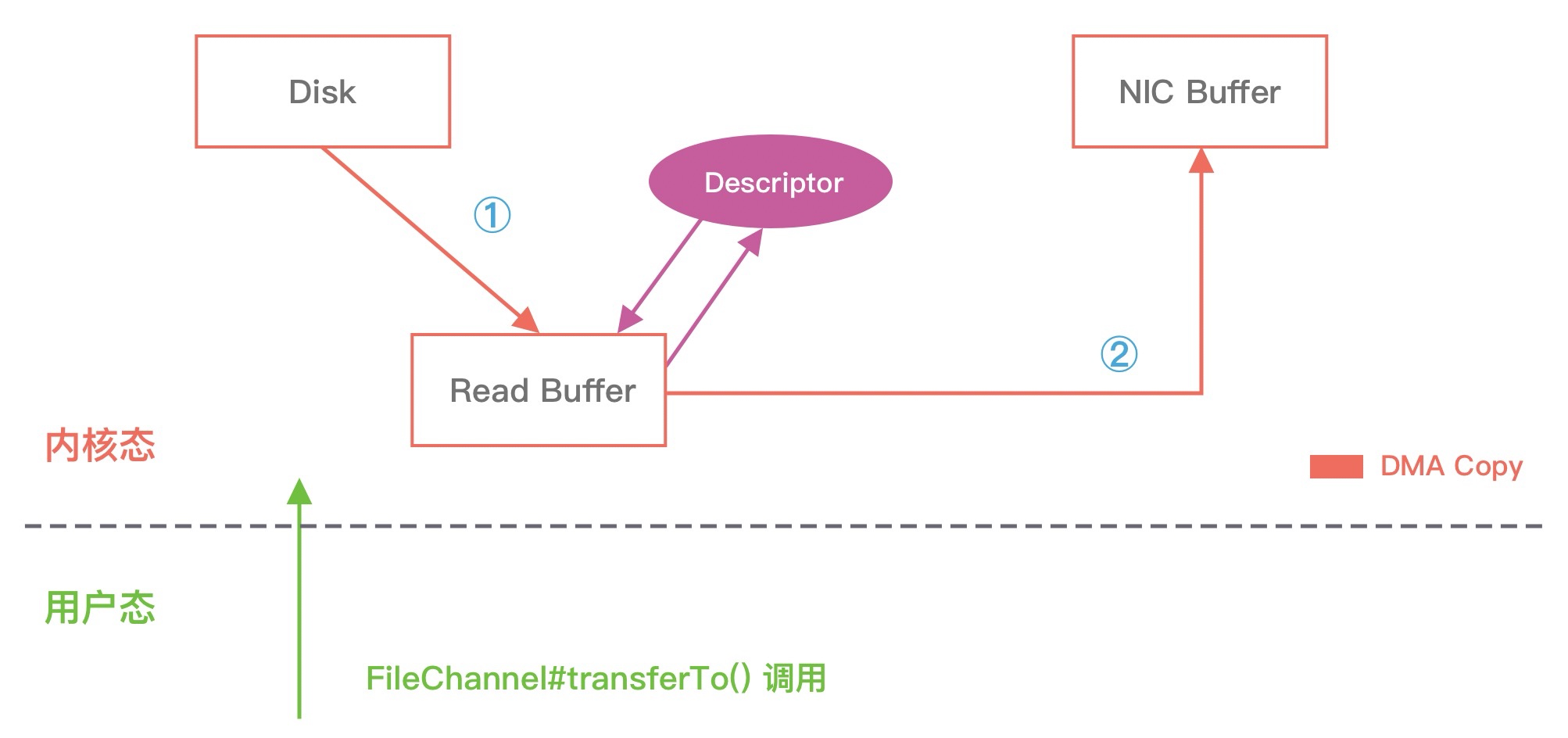
只剩 2 次 DMA 拷贝,CPU 全程不参与数据搬运,这才是真正意义上的"零拷贝"(零 CPU 拷贝)。
package com.dd.other;

import java.io.File;
import java.io.FileInputStream;
import java.io.FileOutputStream;
import java.io.RandomAccessFile;
import java.nio.channels.FileChannel;

/**
 * @author lindd
 * @version 1.0
 * @description 零拷贝
 * @date 2025/9/22 16:34:16
 */
public class ZeroCopy {
    public static void main(String[] args) throws Exception {
        File input = new File("D:\\360Downloads\\XMind2023-v23.11.3771-Green.rar");
        File tcOutput = new File("D:\\360Downloads\\XMind2023-v23.11.3771-Green2.rar");
        File zcOutput = new File("D:\\360Downloads\\XMind2023-v23.11.3771-Green3.rar");

        // 分别测试传统拷贝和零拷贝
        traditionalCopy(input, tcOutput);
        zeroCopy(input, zcOutput);
    }

    public static void traditionalCopy(File input, File output) throws Exception {
        long start = System.currentTimeMillis();
        // 使用 try-with-resources 确保资源正确关闭
        //  try (RandomAccessFile rafRead = new RandomAccessFile(input, "r");
        //        RandomAccessFile rafWrite = new RandomAccessFile(output, "rw")) {
        try (FileInputStream rafRead = new FileInputStream(input);
             FileOutputStream rafWrite = new FileOutputStream(output)) {
            byte[] buf = new byte[1024];
            int len;
            while ((len = rafRead.read(buf)) != -1) {
                rafWrite.write(buf, 0, len);
            }
        } // try-with-resources 会自动关闭 rafRead 和 rafWrite
        long end = System.currentTimeMillis();
        System.out.println("traditionalCopy 用时为: " + (end - start) + "ms");
    }

    public static void zeroCopy(File input, File output) throws Exception {
        long start = System.currentTimeMillis();
        // 使用 try-with-resources 确保资源正确关闭
        try (FileInputStream fis = new FileInputStream(input);
             FileOutputStream fos = new FileOutputStream(output)) {
            FileChannel srcChannel = fis.getChannel();
            FileChannel destChannel = fos.getChannel();
            // 使用 transferTo 实现零拷贝
            long size = srcChannel.size();
            long transferred = 0;

            while (transferred < size) {
                transferred += srcChannel.transferTo(transferred, size - transferred, destChannel);
            }
            //srcChannel.transferTo(0, input.length(), destChannel);
        } // try-with-resources 会自动关闭 fis 和 fos
        long end = System.currentTimeMillis();
        System.out.println("ZeroCopy 用时为: " + (end - start) + "ms");
    }
}
4. mmap
mmap 是另一种减少拷贝的方式,把文件直接映射到进程的虚拟地址空间,应用程序可以像操作内存一样读写文件,省去了内核缓冲区→用户缓冲区的拷贝:
磁盘 → DMA 拷贝 → 内核缓冲区(PageCache,与用户空间共享)
     → CPU 拷贝 → Socket 缓冲区
     → DMA 拷贝 → 网卡
3 次拷贝,比传统 IO 少一次 CPU 拷贝。适合需要在用户态处理数据的场景(比如修改内容后再发送),sendfile 不经过用户态所以没法修改数据。
Java 中 FileChannel.map() 返回的 MappedByteBuffer 就是 mmap 的封装。
5. 对比
| 方式 | CPU 拷贝 | DMA 拷贝 | 上下文切换 | 适用场景 |
|---|---|---|---|---|
| 传统 IO | 2 | 2 | 4 | - |
| mmap + write | 1 | 2 | 4 | 需要在用户态处理数据 |
| sendfile | 1 | 2 | 2 | 文件直接转发,不需要修改 |
| sendfile + DMA Gather | 0 | 2 | 2 | 文件直接转发,网卡支持 SG-DMA |
6. 实际应用
- RocketMQ:CommitLog 写入用
mmap(MappedByteBuffer),消息发送给消费者用sendfile,详见 RocketMQ消息持久化 - Kafka:消息发送给消费者用
sendfile(FileChannel.transferTo()) - Nginx:静态文件服务开启
sendfile on后走零拷贝路径 - Netty:
FileRegion接口底层使用transferTo()